BorgBackup Web UI · Open Source · Self-Hosted

The most comprehensive Enterprise Web GUI for BorgBackup

Borg Backup Server is a self-hosted web UI for BorgBackup. Centrally manage encrypted backups across Linux, Windows, and MacOS with zero-trust agents, policy-based scheduling, fast file-level restores, offsite replication, and enterprise access controls (SSO/RBAC/TOTP-based 2FA).

Set it up in under 5 minutes: Docker Installation

  • MIT Licensed
  • Self-Hosted
  • Linux · Windows · MacOS
  • Built on BorgBackup
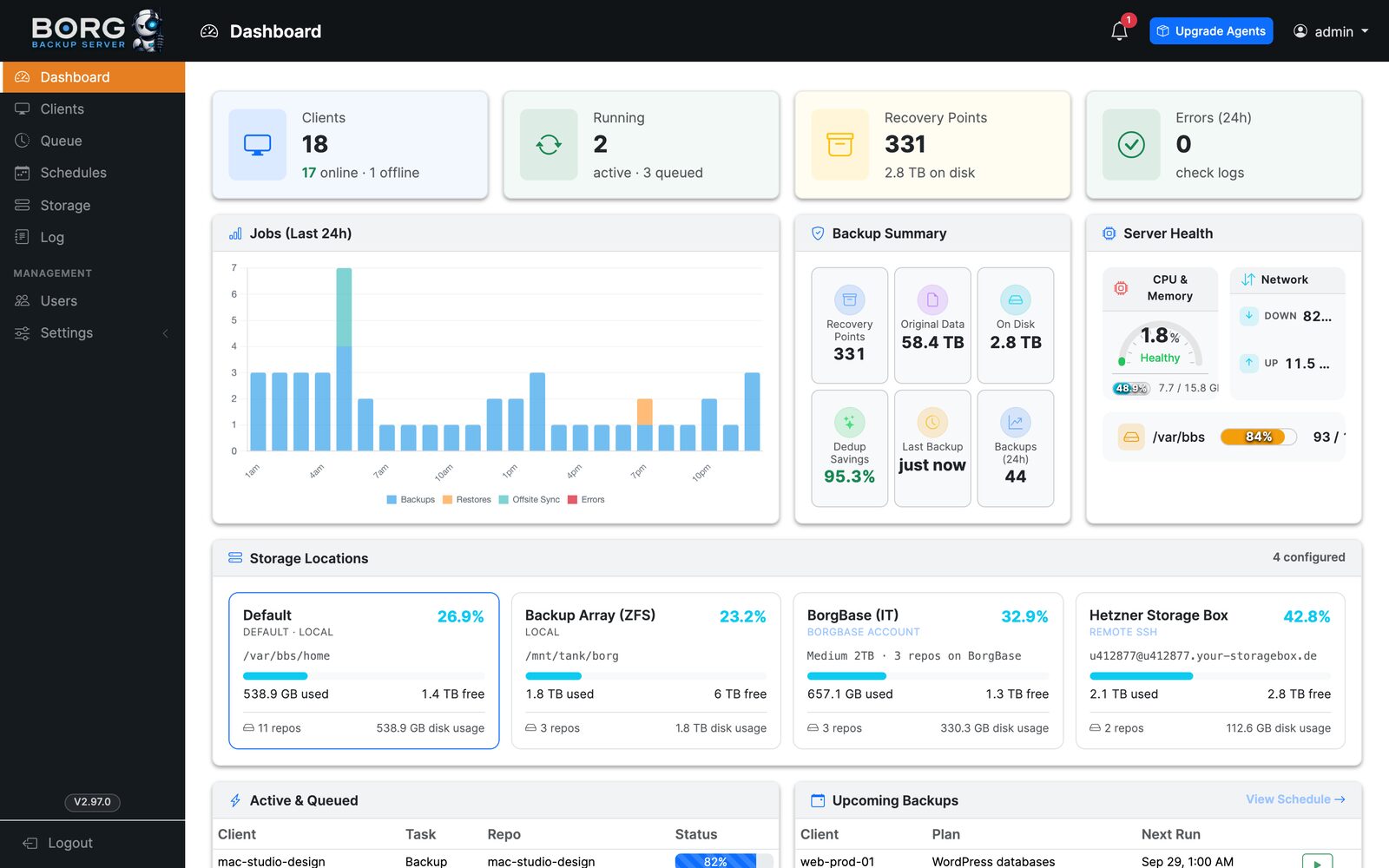
The Borg Backup Server web UI — a BorgBackup dashboard showing clients, running jobs, recovery points, 24-hour backup activity, backup summary, server health, storage locations, upcoming backups, and recently completed jobs
Built for Zero Trust

The backup server never needs access to your endpoints.

Traditional backup servers initiate connections into protected systems. BBS reverses that model. Lightweight agents poll BBS over HTTPS for tasks, send backups directly over SSH, and report status back to the server.

NO INBOUND CONNECTIONS TO ENDPOINTS
OPTIONAL REPLICATION BBS Server CONTROL PLANE Linux agent OUTBOUND ONLY Windows agent OUTBOUND ONLY MacOS agent OUTBOUND ONLY Borg repository SSH · APPEND-ONLY Local storage ON THE BBS SERVER Borg SSH host rsync.net · BorgBase Hetzner Storage Box S3 object storage poll for tasks · HTTPS backups · SSH

Agent-Initiated

Endpoints poll BBS for work over HTTPS. No inbound firewall rules or server-initiated SSH access required.

Append-Only Repositories

Backup agents can create archives but cannot delete or prune repository data — even a fully compromised client can't destroy history.

Encrypted by Default

Borg repositories remain encrypted at rest, while stored credentials and repository passphrases are protected with AES-256-GCM.

root@web-prod-01 — ssh
$ borg create ::web-prod-01-2026-08-08 /var/www /etc
$ borg prune --keep-daily 7 --keep-weekly 4 --keep-monthly 6
$ borg check --repository-only
$ borg extract ::web-prod-01-2026-08-07 var/www/config.php
# repeat × 124 endpoints · every schedule · every restore

Backup Schedules

#23
Daily Backup Daily @ 02:00 web-prod-01
Current Status: Active
Add Backup Plan
From Command Line to Control Plane

Keep BorgBackup. Lose the operational overhead.

BorgBackup is exceptionally powerful. BBS adds the web GUI and centralized management layer required to operate it across dozens, hundreds, or thousands of systems.

  • Centralized endpoint management
  • Policy-based backup plans
  • Real-time job monitoring
  • Repository health management
  • Searchable file catalogs
  • Browser-based restores
  • Automated retention
  • Offsite replication
  • Reporting and alerting
Enterprise Features

A complete backup platform in one web UI.

Scheduling, recovery, and storage management — the capabilities IT teams expect from commercial backup software, without the license.

Backup Operations

Flexible Scheduling

Run plans hourly, daily, weekly, monthly, or on demand. Assign multiple backup plans to individual endpoints.

Backup Templates

Create reusable filesystem templates for web servers, databases, workstations, application servers, and custom workloads.

Retention Policies

Configure hourly, daily, weekly, monthly, and yearly retention policies per backup plan.

Queue Management

Control concurrency, monitor running jobs, cancel operations, and retry failed tasks.

Recovery

Instant File Search

Catalog backup metadata in ClickHouse for fast searching without locking or mounting Borg repositories.

File-Level Restore

Browse archived directory trees and restore individual files directly from the web UI.

Archive Downloads

Extract selected backup content and download it directly as a .tar.gz archive.

Database Recovery

Restore MySQL, PostgreSQL, and MongoDB backups into the original database or into a separate database copy.

Storage

Local Borg Repositories

Manage storage directly from BBS using secure SSH-based Borg repositories.

S3 Offsite Replication

Mirror repositories to S3-compatible object storage including AWS S3, Wasabi, and Backblaze B2.

Remote Borg Storage

Connect to BorgBase, Hetzner Storage Boxes, rsync.net, or other Borg-compatible SSH storage.

Repository Management

Perform Borg repository maintenance including unlock, check, repair, and re-catalog operations.

Explore All Features
Plugins & Automation

Back up more than files.

BBS plugins extend backup workflows with application-aware operations that run before or after Borg jobs. MySQL, PostgreSQL, and MongoDB are built in — and shell hooks cover everything else.

MySQL

Automatically create database dumps before backup and restore databases from archived snapshots.

PostgreSQL

Perform PostgreSQL-aware backups with automated recovery workflows.

MongoDB

Consistent MongoDB dumps before each backup, with restores back into the original or a separate database.

Shell Scripts

Hook in any other database or application — Redis, MariaDB, SQLite, LVM/ZFS snapshots, you name it — with custom pre-backup and post-backup scripts.

BBS plugin configuration: the MySQL Backup/Restore plugin enabled, a MySQL connection form with dump directory and mysqldump options, and the plugin picker showing MySQL and InterWorx plugins assigned to a backup plan
Identity & Access

Enterprise access controls are built in.

Client Access & Permissions j.chen · User · 2FA on
Access All ClientsUser will have access to all current and future clients
ClientViewRun
Backups
Manage
Repos
Manage
Plans
Perform
Restores
Repo
Maint
web-prod-01
db-primary
mac-studio-design
nas-office
win-accounting

Single Sign-On

Plug BBS into the identity provider your organization already runs — one login, no separate backup passwords.

Per-Client Permissions

Decide which clients each user can see, and exactly what they can do on each one — view, run backups, restore, manage plans and repos, or maintain repositories.

Two-Factor Authentication

TOTP-based 2FA with recovery codes for local accounts — works with any authenticator app.

Multi-User Administration

Admins run the platform; Users get scoped access. Safely delegate backup operations across infrastructure, support, and operations teams.

Real-Time Operations

Know exactly what your backups are doing.

Every job streams progress, transfer statistics, and full Borg output to the web UI as it runs.

  • Real-time progress and transfer rates
  • Detailed logs for every operation
  • Queue position and concurrency control
  • Retry and cancellation controls
  • Historical execution data
web-prod-07backing up /var/www
RUNNING
82%184.7 GB / 224.9 GB
418 MB/sTransfer Rate
1,284,442Files Processed
14m 28sElapsed
96.1%Deduplicated
A /var/www/shared/uploads/2026/08/report-8841.pdf
A /var/www/releases/20260808/vendor/autoload.php
M /var/www/shared/cache/routes.php
A /var/www/shared/uploads/2026/08/invoice-2214.pdf
Offsite & Disaster Recovery

Your backup shouldn't have only one backup.

Automatically replicate local repositories to S3-compatible object storage to maintain geographically separated copies and improve disaster recovery resilience.

Endpoints 124 clients · borg agents
BBS Server control plane · scheduling · catalogs
Encrypted Borg Repository deduplicated · append-only
AWS S3
Wasabi
Backblaze B2
BorgBase
Hetzner
rsync.net
Self-Protecting Control Plane

BBS backs up itself, too.

Automatically protect the BBS database, configuration, encryption material, and application state with scheduled server backups and optional offsite replication. Restore scripts are generated to simplify disaster recovery.

  • Daily BBS self-backups
  • Optional S3 sync
  • Generated recovery scripts
  • Configuration & key protection
Agent & Borg Versions
Upgrade Selected Upgrade All Agents
EndpointBBS AgentBorg VersionStatus
app-prod-012.8.11.4.1Current
sql-prod-022.8.11.4.1Current
workstation-142.7.41.4.0Update Available
fileserver-032.8.11.4.1Current
Centralized Upgrades

Upgrade your entire backup environment from one place.

BBS can upgrade the server, endpoint agents, and manage Borg versions across protected systems — without manually touching every machine.

  • One-click agent upgrades, fleet-wide or selective
  • Managed Borg versions per endpoint
  • Server self-upgrade from the web interface
Alerting & Reporting

Backups shouldn't fail quietly.

Nightly Backup Reports

Receive daily email summaries covering backup health, failures, storage usage, and job statistics.

Apprise Notifications

Send alerts through more than 100 supported services.

Slack Microsoft Teams Discord Telegram Pushover Email +100 more
Backup Summary — August 7 nightly report · delivered 06:00 UTC
112Successful
3Warnings
1Failed
Protected data12.8 TB
New data (24 h)642 GB
Repositories healthy18 / 18
to: ops-team · via email + Apprise
Simple Deployment

Run it your way.

Docker in a single command, or install directly on bare metal, a virtual machine, or an LXC container. Pick your platform — the Installation guide has current, step-by-step instructions for each.

Instructions live in the wiki so they stay current with every release. Read the Installation guide

Borg for Windows

Windows endpoints, backed up by real Borg.

BorgBackup has never shipped a native Windows binary — the usual workarounds are WSL, Cygwin, or leaving Windows machines unprotected. So we compiled one. A native borg.exe that reads NTFS the way Windows does, needs no Python on the target machine, and backs up and restores NTFS permissions — owner, group, and DACL — as SDDL.

It is free, BSD 3-clause, maintained by us alongside BBS, and running today across hundreds of production endpoints.

  • Native build — no WSL or Cygwin
  • NTFS ACL backup and restore
  • Standalone — no Python required
  • Standard, portable Borg repositories
PowerShell — WIN-FILE-01
PS C:\> borg.exe --version
borg 1.4.5

PS C:\> borg.exe create ::win-file-01 C:\Users C:\inetpub
Deduplicated size: 1.94 GB
NTFS ACLs: stored (owner, group, DACL)

# native Windows process — not WSL, not Cygwin
Live Demo

Try it before you deploy it.

Spin up a fully functional Borg Backup Server instance in about a minute. Explore the web UI, create backup plans, browse the file restore interface, and test database backup plugins — all in a real environment.

Storage
25 GB
Duration
24 Hours
Spin-up
~1 Minute
Features
Full Access

Launch a Private Demo

No credit card required. We'll email a confirmation link that instantly spins up your demo — fully automated.

Your demo is a private 25 GB virtual container — nothing is saved after 24 hours. Privacy

Open Source

Open source infrastructure you actually control.

Borg Backup Server is MIT licensed and completely self-hosted. Your backup metadata, encryption keys, repositories, authentication systems, and infrastructure remain under your control.

MIT License

Use it. Modify it. Deploy it commercially.

No License Keys

No activation servers or subscription checks.

No Paid Edition

Core functionality is not hidden behind an enterprise tier.

No Hosted Control Plane

Your backup environment does not depend on an external SaaS provider.

View Source on GitHub

Give BorgBackup an enterprise control plane.

Securely manage backups, endpoints, repositories, restores, retention, replication, and reporting from one self-hosted platform.

OPEN SOURCE · MIT LICENSED · SELF-HOSTED